TaxiDex Driver
The driver app that keeps the shift moving
Job offers that take one tap, a taximeter built into the phone, a receipt for every fare and a chat line to dispatch. Drivers see the next job, the fare and the way to the pickup. Nothing else gets in the way.
Free to install · Drivers sign in with the email and password their fleet gives them.
No Google Play on the device? Download the APK (version 1.0.11, 86 MB).
A new job offer
One shift, screen by screen
From the first job to the last receipt
Follow a driver's day through the app. On a large screen the phone stays put while the steps scroll past; each step shows the screen the driver is looking at.
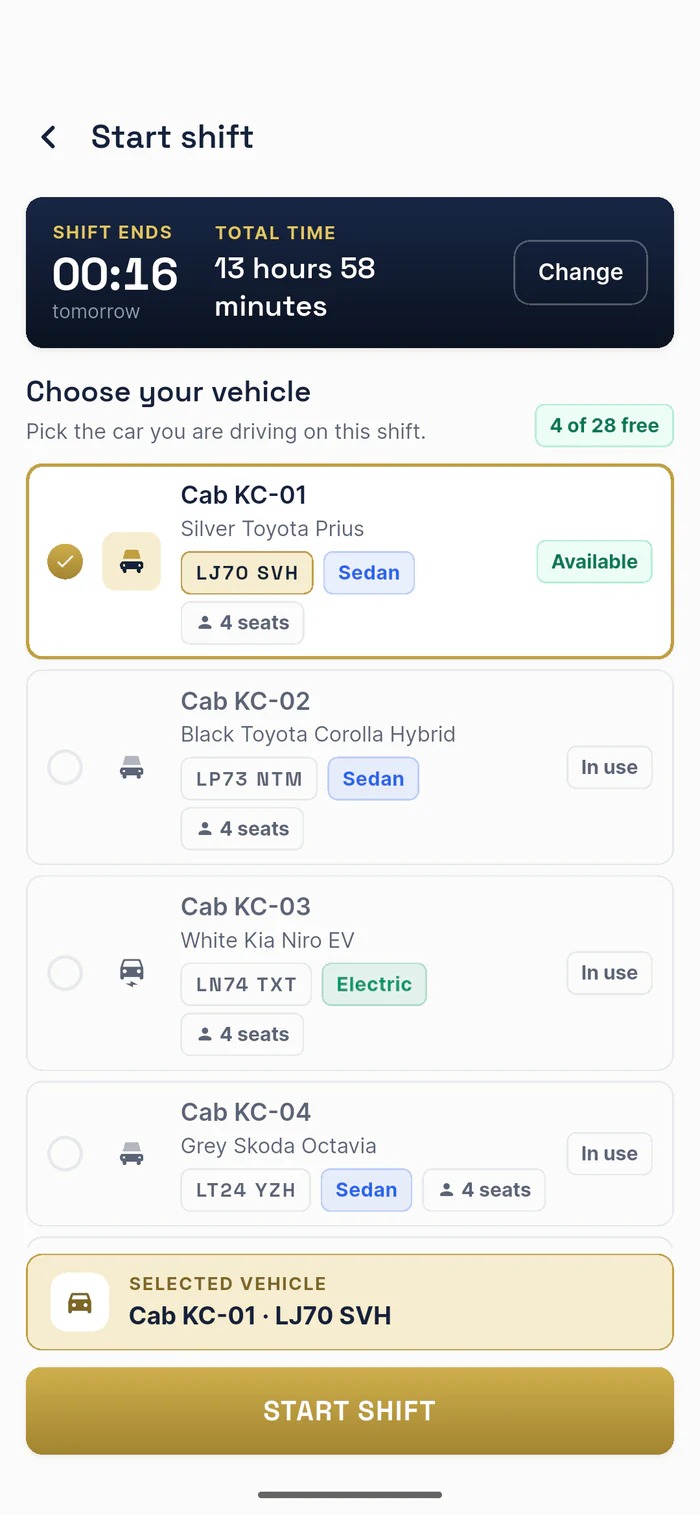
Start of shift
Pick the car, start the shift
The driver chooses the vehicle they are taking today from the ones that are free. From that moment dispatch sees them as on shift, and the shift's own history starts recording.
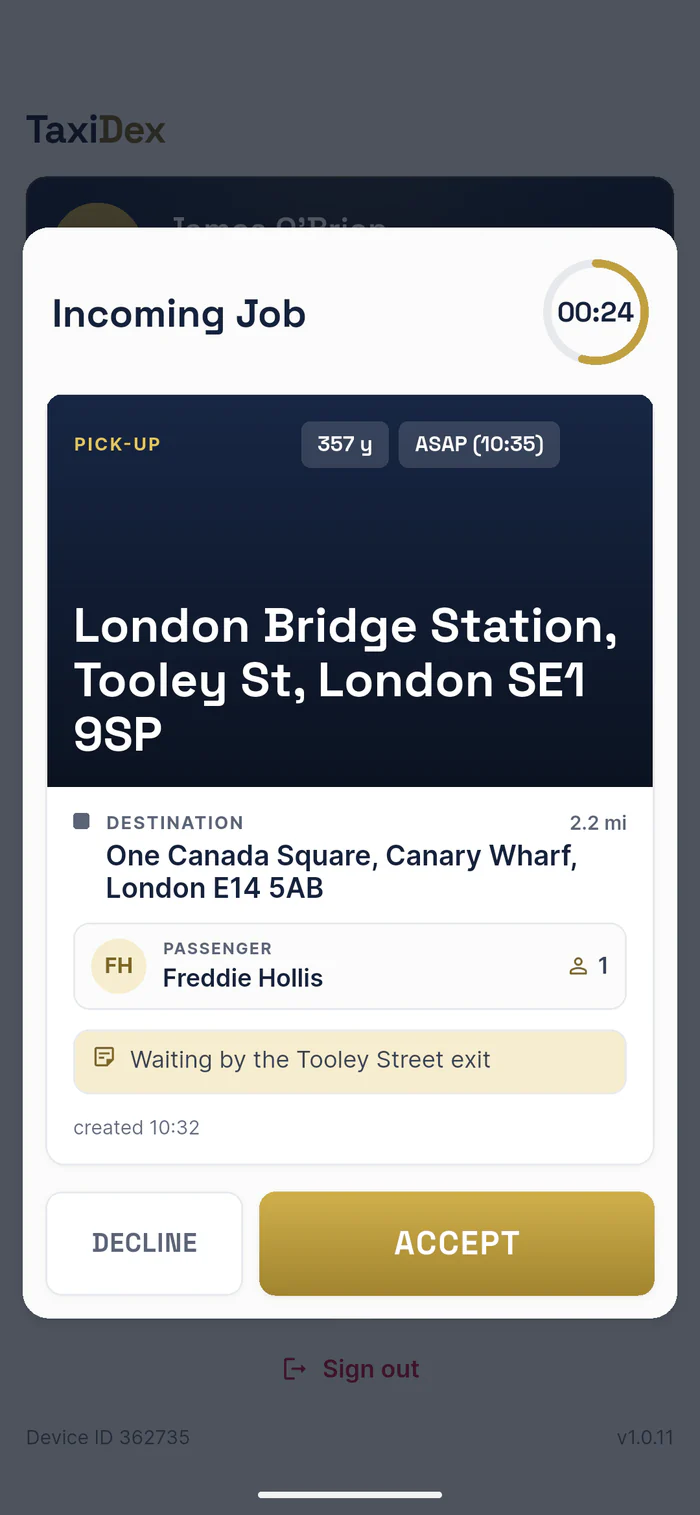
A job comes in
The offer shows everything before the driver says yes
Pickup, destination, passengers, bags and the note from dispatch, with a countdown. One tap to accept, one to decline. If nobody accepts in time, dispatch offers it to the next driver.
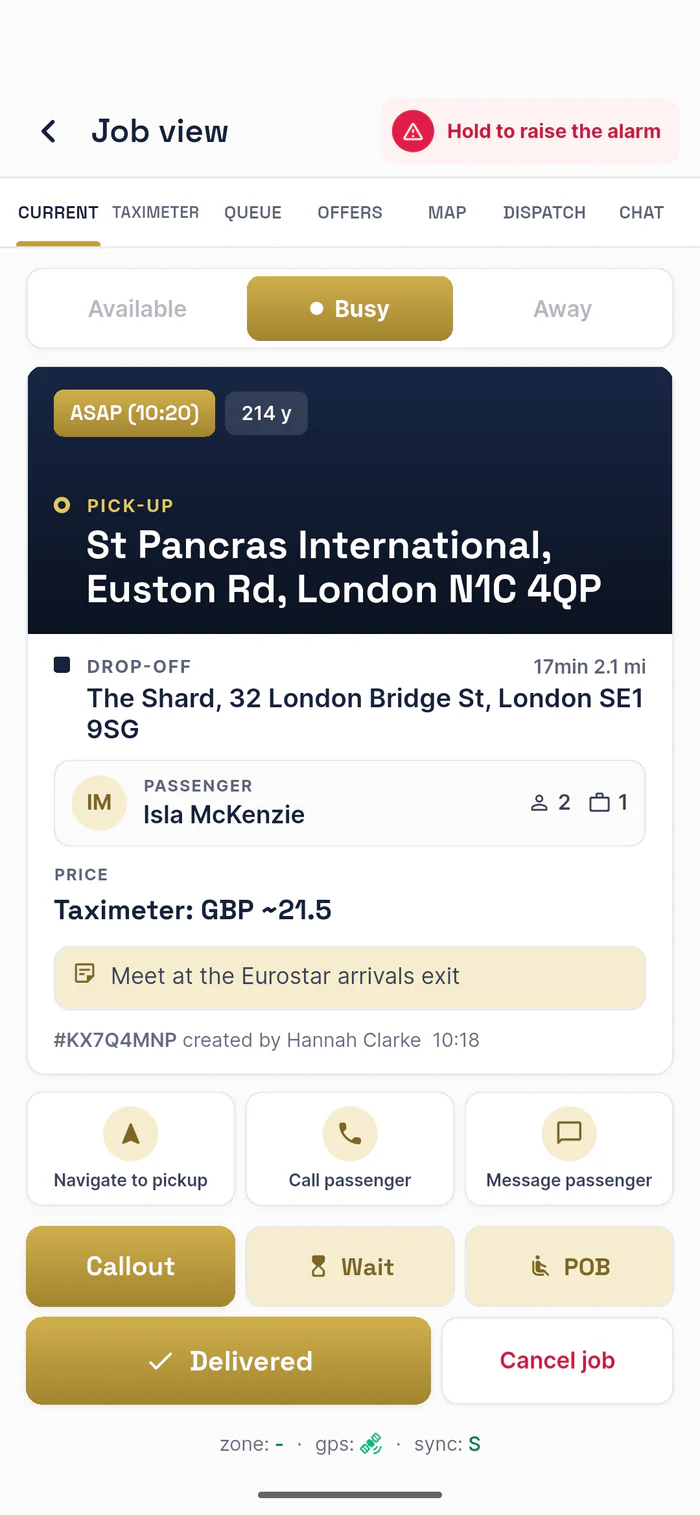
On the way
The whole job on one card
Passenger name and phone, pickup and drop-off, the agreed or metered price, and buttons to call the passenger or open directions in Google Maps or Waze. The status moves with the ride: on the way, passenger on board, delivered.
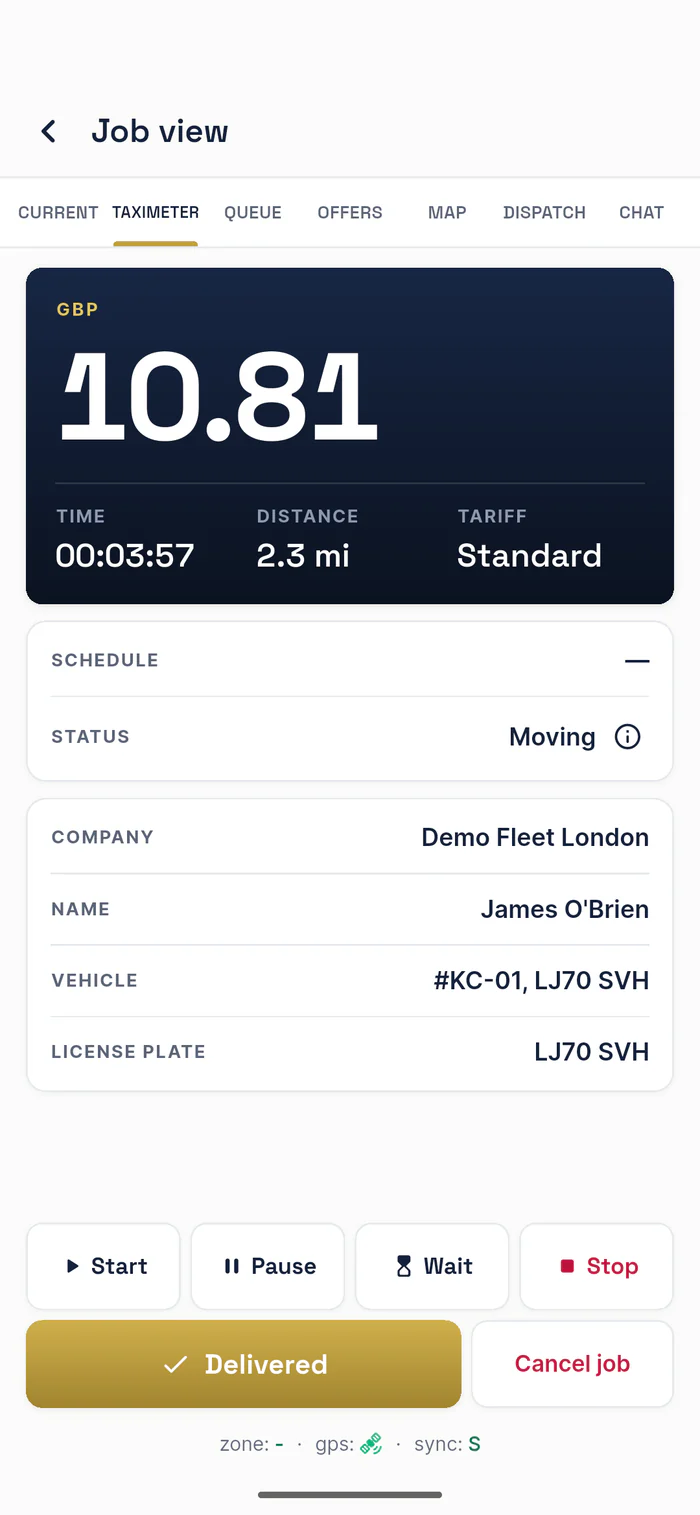
Passenger on board
A taximeter inside the phone
Fare, distance and time count live on the fleet's own tariff, in the fleet's currency and units. For a street pickup the driver starts the meter without a booking, and the job is recorded as cash by default.
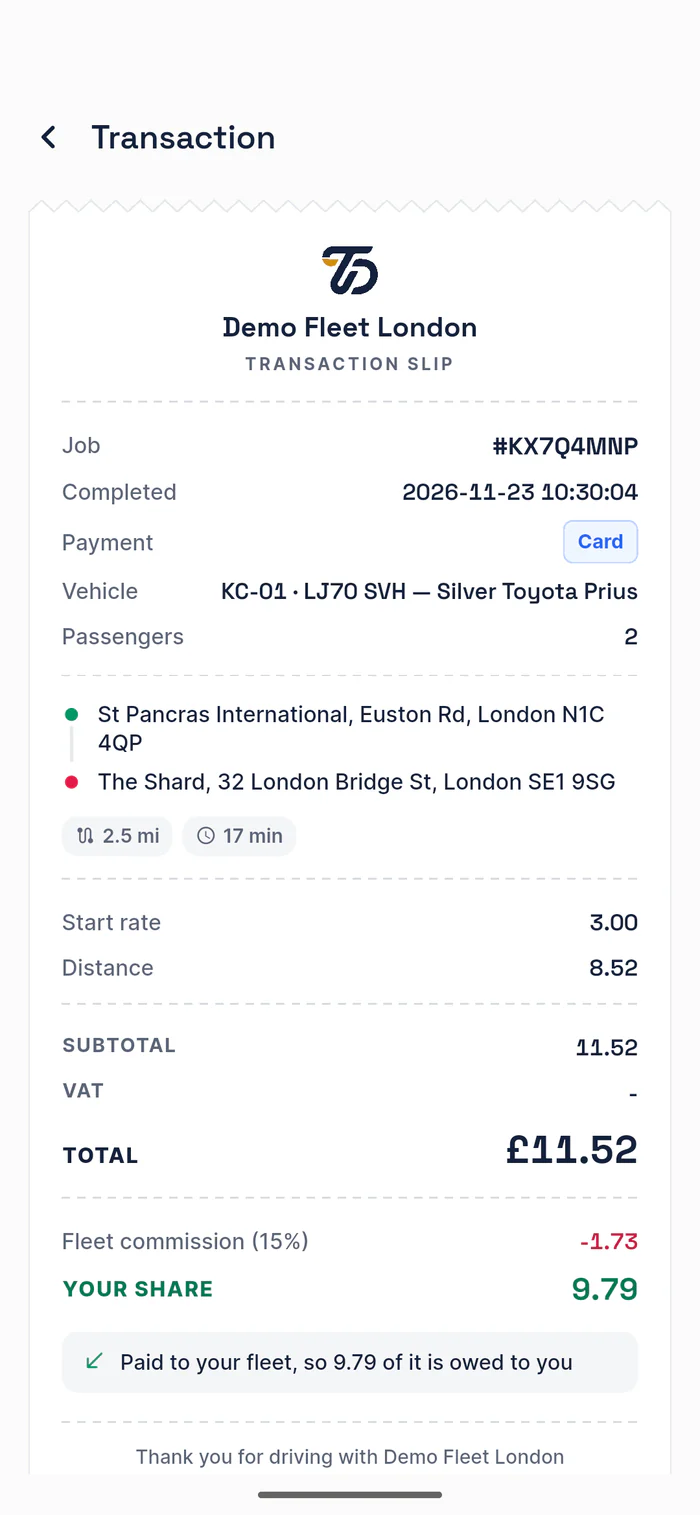
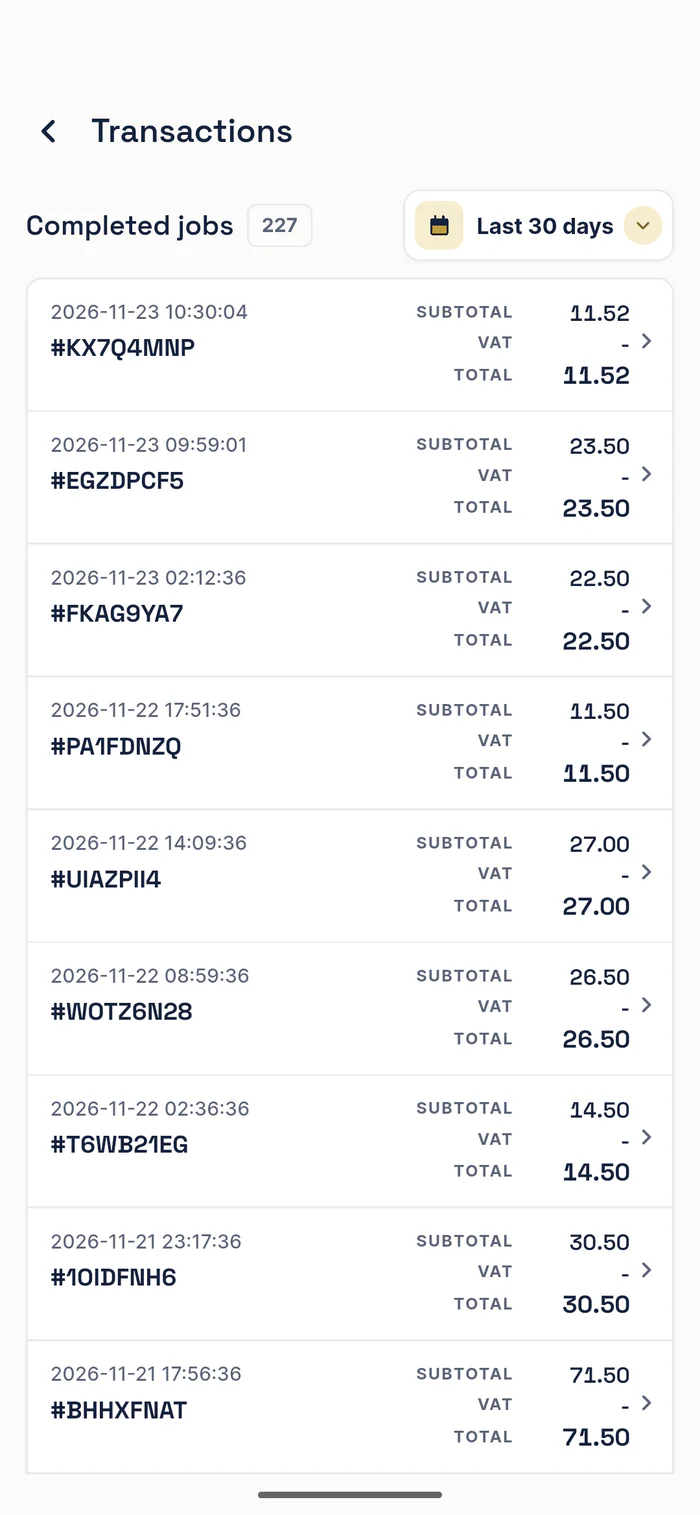
Job done
A receipt for every fare
Each completed job appears in Transactions with the total, the driver's share and the fleet's commission. Opening a job shows the slip, and a PDF receipt can be downloaded for the passenger or the driver's own records.
End of shift
The shift in numbers
Hours, jobs and earnings for every shift, kept per shift so a driver can look back at any day. Transactions can be filtered by date, and a driver report can be sent by email.
Start of shift · Pick the car, start the shift
What is in the app
Everything a driver needs, nothing they do not
Six things the app does, each one shown in the screens above. Fleets switch the optional ones on or off from the console.
One-tap job offers
An offer arrives with a sound and a countdown, and shows the pickup, destination, passengers, bags and dispatch notes. Accept or decline with one tap. Queued and pre-booked jobs sit on their own tabs until it is time to drive.
- Pickup, drop-off, passengers and notes before accepting
- Countdown, then the offer moves to the next driver
- Queue, offers and the current job each on a tab
Built-in taximeter
The meter runs in the app on the fleet's tariffs, with fare, distance and time live on screen. A Bluetooth taximeter dongle can be paired, and the phone can read the fare aloud during a trip. The fleet decides whether the taximeter is on.
- Fleet tariffs, currency and distance unit
- Street pickups start a meter without a booking
- Bluetooth dongle pairing and a fare announcer
Transactions and receipts
Every completed job with its total, the driver's share and the fleet's commission, filterable by date. Each job opens as a slip, and a PDF receipt downloads to the phone.
- Filter by day, week or a custom range
- Driver share and commission on every job
- PDF receipt for any job
Chat and calls with dispatch
Messages from the office arrive in the app and are answered from the job view. When the fleet turns it on, the driver can call dispatch from the same tab, and every dispatcher online rings until one answers.
- Two-way chat with dispatch
- Call dispatch, when the fleet enables it
- Call the passenger straight from the job
Shifts and status
Start a shift by picking the vehicle, set yourself Available, Busy or Away, and see the shift's planned end. Shift history keeps the hours, jobs and earnings of every shift, with a detail page for each one.
- Vehicle choice at the start of a shift
- Available, Busy and Away
- Per-shift history with a detail page
SOS and safety
The SOS button on the job view sends an alert with the driver's location to dispatch, which opens an incident in the console. It has to be held to send, so it cannot go off by accident. Emergency contacts live in the app's Safety settings.
- Hold to send an alert with your location
- Dispatch sees the incident at once
- Emergency contacts in Settings
For the fleet
The driver app is the other half of your dispatch console
Every job offered on the console lands on a driver's phone, and every tap a driver makes comes back to the console. The app is set up from the office, not phone by phone.

Set up once in the console, for every driver
- Set up once, for the whole fleet. Job buttons and their order, sounds, pop-ups and the taximeter are set in the console under Driver app, and apply to every driver. No per-phone setup.
- Dispatch sees what the driver sees. Status changes, the meter and the driver's position reach the console as they happen, so the live map, the job board and the timeline stay current.
- Drivers sign in with their own account. The fleet creates each driver in Settings › Users with the Driver role. The driver signs in with that email and password; the Company ID is for office staff.
- Works where a driver works. Location keeps updating while the driver navigates in Google Maps or Waze, with a visible notification, so the meter and the tracking link do not stop when the app is in the background.
Two apps
The driver app is TaxiDex. The passenger app is yours.
Drivers of every fleet use the TaxiDex Driver app. Your passengers book in TaxiDex: Book a Taxi on Google Play, or in your own app under your name, logo and colours.
For your drivers
TaxiDex Driver
One app for every fleet, kept up to date by us. Drivers sign in with the account their fleet gives them and see only their fleet's work.
- TaxiDex-branded, for all fleets
- Free to install
- Set up from your console
For your passengers
TaxiDex: Book a Taxi
Free on Google Play: passengers enter your company code once and book your cars. Want it under your own name? We build the same app with your logo and colours, and handle the store submission.
- Free to install
- Or your own branded app
- Bookings arrive in your dispatch console
FAQ
Driver app questions, answered
How do my drivers get the app?
From Google Play: search for TaxiDex Driver, or tap Install from Google Play on this page. On a device without Google Play, such as some car head units, use the Download the APK link on this page instead; the device then asks once to allow installs from the browser.
How does a driver sign in?
With the email address and password the fleet set for them in the console (Settings › Users, Driver role). Drivers do not use the Company ID; that is for office staff signing in to the web console.
Is the driver app in my fleet's branding?
No. The driver app is the TaxiDex Driver app for every fleet. The passenger app is the one that can carry your brand: passengers can use TaxiDex: Book a Taxi from Google Play, or we publish it under your company name, logo and colours.
Can drivers use it without a booking from dispatch?
Yes. A driver can start the taximeter for a street pickup, and the job is recorded under the fleet with the real drop-off. By default it is a cash job; a fleet can choose account instead.
What does the fleet control?
Whether the in-app taximeter is on, which buttons drivers see and in what order, sounds and pop-ups, whether drivers can call dispatch by voice, how jobs are offered, and the tariffs, currency and distance units.
Which phones does it run on?
Phones, tablets and car head units, 64-bit and 32-bit, in portrait or landscape. Location, microphone (for calls), nearby devices (for a Bluetooth taximeter dongle) and notifications are asked for on first use.
See the app on a real phone, with jobs coming from your console
Half an hour. We set up your zones and fares live, send a job from the console, and run it end to end in the driver app.
