
Web Booker
A taxi web booker you can embed on your own site in minutes
A responsive online booking widget for desktop and mobile browsers — put it on your own website, hand it to hotel and airport partners, or run it as a standalone booking page. No app install, no developer, no second system.
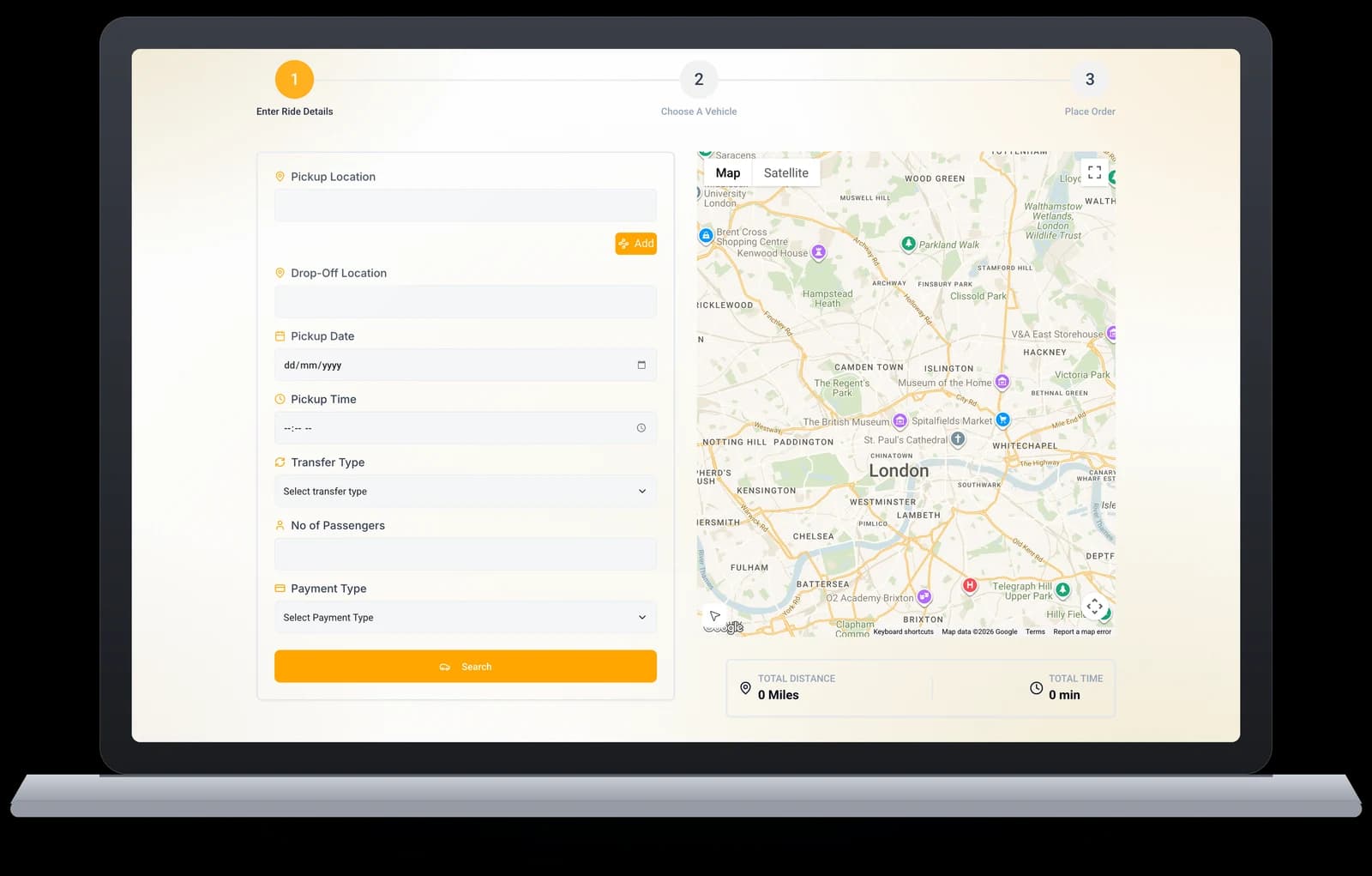
Adding an online taxi booking widget to your website
An online taxi booking widget is a booking form you embed on your own site so customers can book, price and pay without phoning the office. TaxiDex's is a single script tag — paste it into your existing site, WordPress or otherwise, and it appears in your colours, your logo and your fare rules.
The point is not the form; it is what happens after it. A booking taken through the widget lands directly in the same dispatch queue as a phone booking, priced by the same fare engine, and auto-dispatch offers it to a driver immediately. Nobody re-keys anything, so a booking taken at 3am is assigned before your office opens.
It quotes the fare before the customer commits, using your real zones, vehicle classes and surcharges — so the price on your website is the price on the invoice. Card, Apple Pay and Google Pay are handled inline, and every booking carries the customer straight into your records for the next time they book.
3 min
To embed widget
100%
Mobile responsive
22
Languages
14 days
To go live
Definition
What a taxi web booker actually is
If you have only ever taken bookings by phone and app, here is the plain version.
A web booker is an online booking form that lives on your own website. A passenger picks up their phone or opens a laptop, types a pickup and a destination, sees a real price before they commit, pays, and the job lands in your dispatch queue — the same queue your phone bookings and app bookings land in. No one at your office retypes anything.
The important part is that last clause. Plenty of taxi websites have a “request a quote” form. That is not a web booker — that is an email that someone has to read, price, phone back, and key into dispatch. A real web booker prices the job itself, takes the money, and creates the booking.
The three ways operators run one
- Embedded on your existing site.One HTML snippet pasted into your homepage, your “book now” page, or your footer. Works on WordPress, Wix, Squarespace and hand-built sites. This is what most operators start with.
- As a standalone booking page. Hosted on your own domain — useful if your main site is old, slow, or controlled by an agency you would rather not wait on.
- Handed to a partner.The same widget on a hotel’s concierge page or an airport transfer desk, pointed at a corporate account so the bookings bill back correctly.
What it is not
It is not a separate system. A web booking is not a lead, a callback request, or a row in a spreadsheet you reconcile later — it is a first-class booking, priced by the same fare engine, assigned by the same auto-dispatch rules, tracked on the same map, and settled in the same accounts as every other job you run.
Capabilities
Everything passengers need, without an app install
The Web Booker is the same TaxiDex platform your dispatchers run — exposed as a booking widget any website can carry. Same fare engine, same dispatch queue, same payments.
Embeddable iframe
Drop one HTML snippet into any site. Works on WordPress, Wix, Squarespace, hand-coded sites, and hotel portals — the widget renders responsively inside whatever layout already exists.
- Copy-paste embed — no developer required, no plugin to maintain
- Also runs as a standalone booking page on your own custom domain
- Bookings land in the same dispatch console as app and phone jobs
Flight Lookup
Type a flight number, we auto-detect the gate and adjust pickup as the arrival shifts. Perfect for airport transfers booked hours — or days — before the plane takes off.
- Flight-aware tracking re-times pickups on delays and early landings
- Drivers are re-dispatched automatically when arrival times move
- Ideal for hotel desks pre-booking guest pickups in advance
Mobile-First UI
Built mobile-first. Loads in under 800ms on 3G. Looks great on every screen from 320px to 4K — a guest on hotel Wi-Fi gets the same fast flow as a corporate desk on fibre.
- 22 languages with full right-to-left support for Arabic markets
- Works in any modern browser — nothing to install, nothing to update
- One responsive build covers phones, tablets, kiosks, and desktops
Web Payments
Apple Pay & Google Pay on supported browsers. Hosted card forms via Stripe and Square — PCI compliance handled, so card data never touches your servers.
- Cards are stored with the payment gateway, never by your fleet
- Corporate accounts can book against monthly invoicing instead of a card
- Refunds handled from the operator console, reflected instantly
Custom Branding
Your colors, your logo, your font. Hand off a single CSS file or use our visual customizer — passengers see your fleet's brand end to end, never ours.
- White-label across the widget, emails, and track-my-ride links
- Matches the branding of your your own branded passenger app plus the TaxiDex driver app
- Host the full booking page on your own custom domain
Multi-Account
One widget, many cost centers. Hotels can split bookings between concierge, business class, and corporate — each account keeps its own rates, cost codes, and reporting.
- Per-account rates and cost codes applied automatically at booking
- Consolidated monthly invoices through the corporate billing suite
- Booking reports filtered by account inside the console
Setup
Live on your site in three steps
Embedding takes about three minutes. There's no SDK to integrate, no API keys to rotate, and no release cycle to coordinate — the widget updates itself from the cloud.
Paste the snippet
Copy one HTML snippet from your TaxiDex console and paste it into any page — WordPress, Wix, Squarespace, a hand-coded site, or a hotel partner's portal. That's the whole integration.
Apply your brand
Point the visual customizer at your colors, logo, and font — or hand our team a single CSS file. Want a full standalone page instead of an embed? We host the booker on your own custom domain.
Take bookings
Passengers get an upfront quote priced by your fare engine, pay with Apple Pay, Google Pay, or card, and the job drops straight into your dispatch queue — no rekeying, no second system.
Behind the widget
What happens after a passenger taps Book
A web booking isn't a lead form that someone retypes into dispatch. It's a first-class booking in the same system as your apps and phone lines — priced, dispatched, tracked, and billed automatically.

Every web booking lands straight in dispatch
A booking made on your website is indistinguishable from one made in your passenger app: it lands in the same bookings list, is priced by the same fare engine, and is assigned by the same auto-dispatch rules engine. Dispatchers can drag it between drivers on the dispatch board or pre-assign it to a specific chauffeur — no swivel chair, no second queue.
The passenger gets a public track-my-ride link — shareable, no account or app required — plus a customer self-service portal for ride history and receipts. Hotels love this split: the concierge books, the guest tracks.

Quotes priced by the enterprise fare engine
The fare a passenger sees on the widget is computed server-side by the same enterprise fare engine that prices every other channel: zones drawn on a live map, zone-to-zone pricing, surge and surcharge rules, per-region tax rules, and promo codes all resolve in one pass. Multipliers stack with caps so surge never runs away, and fixed fares stay fixed.
Because every quote is backend-computed and auditable, the price on the widget matches the receipt at drop-off — across currencies and regions, from the UK and UAE to Saudi Arabia, Nigeria, and Kenya.

Flight lookup that moves with the plane
Add a flight number on the widget and TaxiDex watches the arrival in real time. Early landing? The pickup moves up and the driver is re-dispatched. Two-hour delay? The car isn’t burning waiting time at the curb. The gate is auto-detected and the booking simply stays correct — the passenger does nothing.
For airport transfer desks and hotel concierges pre-booking guests days in advance, flight-aware pickups are the difference between a smooth curbside meeting and a no-show dispute.

One widget, many cost centers
Multi-account support lets a hotel split bookings between concierge, business class, and corporate cost centers — each with its own rates and cost codes. Corporate travel desks book against an account instead of a card, and finance receives one consolidated invoice from the corporate billing suite at month end.
Recurring bookings cover standing transfers — the daily crew run, the weekly executive pickup — configured once and recreated automatically, with every trip accumulating against the right account.
Phone vs web
What changes when bookings stop coming through the phone
Phone bookings are not going away, and they shouldn't. But every booking that arrives through the widget is one your dispatcher didn't have to type.
| Feature | TaxiDex | Phone booking |
|---|---|---|
| Who keys in the job | The passenger | Your dispatcher |
| Available at 3am | Only if staffed | |
| Cost per booking taken | No staff time | Dispatcher minutes |
| Address accuracy | Map-validated | Heard and retyped |
| Price agreed before the trip | Upfront quote shown | Usually estimated |
| Payment taken at booking | Card, Apple Pay, Google Pay | In-car or account |
| Handles simultaneous bookings | ||
| Works for a passenger who won't install an app | ||
| Good for elderly and account regulars | Sometimes | Yes — keep the line |
| Passenger record created automatically | Manual |
Note the row about elderly and account regulars. We are not telling you to switch the phones off. A large share of taxi work — hospital runs, account regulars, older passengers — will always come by voice, and a web booker does not serve those people better. What it does is take the routine, predictable jobs off the phone queue so the calls that actually need a human get answered faster.
The other structural change is the record. A phone booking gives you a job. A web booking gives you a job and a customer — a name, an email, a saved address, and a booking history you can market to later with promo codes and loyalty points.
Who it's for
Built for hotels, airports, and corporate desks
Anywhere a passenger has a browser but not your app, the Web Booker turns that screen into a booking channel for your fleet.
Booking for a corporate travel desk with cost centres, approval rules and monthly invoicing? The corporate web booker is the same widget wired to account billing instead of a card. Most fleets run both: the standard web booker on the public site, the corporate one behind an account login.
Cost
What a web booker costs
Nothing extra. The widget is part of the platform on every plan, including the entry tier.
TaxiDex is priced per active driver — about £11 per driver a month on Starter (1–20 drivers), £9 on Professional (21–100), and from £7 on Enterprise (100+), subject to a £79 (about $100) monthly minimum so the smallest fleets still get the whole platform at a flat floor. The web booker is included at every one of those tiers, alongside the your own branded passenger app plus the TaxiDex driver app and your migration. There is no per-booking fee on web bookings, no commission on the fare, and no separate widget licence.
We do not meter trips, so a busy month costs the same as a quiet one at the same driver count — there are no trip allowances to buy and nothing to go over. Separately, there is a one-time setup, scoped to your fleet and quoted up front on your demo call, so it is never a surprise line on an invoice.
That matters because on several legacy platforms the online booker is commonly quoted as a priced module rather than part of the product — you buy dispatch, then you buy the web booker, then you buy the branding on top of it. Ours is one line on one invoice.
Full tier breakdown and a driver-count calculator are on the pricing page. If you are currently paying for an online booking module as an add-on, the iCabbi and Cordic comparisons show where that lands — competitor figures there are indicative, so check your own quote.
FAQ
Web Booker questions, answered
How long does it take to go live with TaxiDex?
The migration protocol targets a 14-day go-live. We migrate driver data, historical bookings, and customer accounts from Autocab, iCabbi, Cordic, or any legacy system, following a published 14-day protocol.
Does TaxiDex work for limo and chauffeur fleets?
Yes. TaxiDex Enterprise includes flight tracking, hotel concierge web booker, B2B corporate invoicing, and VIP workflows specifically designed for premium chauffeur and corporate transport operations.
What payment gateways are supported?
Stripe (default global), Worldpay (UK), Trust Payments, Apple Pay, Google Pay, plus regional gateways: STC Pay & mada (Saudi), Paystack & Flutterwave (Nigeria), M-Pesa (Kenya), and any custom merchant on request.
How is TaxiDex priced?
Per active driver, and nothing else — we do not meter trips. About £11 ($14) per driver a month on Starter (1–20 drivers), £9 ($11) on Professional (21–100), and from £7 ($9) on Enterprise (100+), subject to a £79 (about $100) monthly minimum. On Professional and Enterprise that typically lands 20% or more under the pricing commonly quoted for Autocab, iCabbi, Cordic and TaxiCaller — check your own quote. your own branded passenger app plus the TaxiDex driver app, migration and the web booker are included in the rate; there is also a one-time setup, scoped to your fleet and quoted up front on your demo call.
Can passengers book without installing an app?
Yes. The TaxiDex Web Booker is an embeddable booking widget for desktop and mobile browsers — perfect for hotel concierge desks, airports, and corporate intranets. One HTML snippet to embed.
What is a web booker for a taxi company?
A web booker is an online booking form on your own website that prices the job, takes payment, and drops the booking straight into your dispatch queue — no callback, no retyping. It differs from a 'request a quote' form because it creates a real, priced, dispatchable booking rather than an enquiry someone has to action by hand.
How do I add a booking form to my taxi website?
Copy one HTML snippet from your TaxiDex console and paste it into any page — WordPress, Wix, Squarespace or a hand-coded site. It takes about three minutes and needs no developer, no plugin and no API keys. If you would rather not touch your existing site, we can host the booker as a standalone page on your own domain instead.
Does the web booker cost extra?
No. The web booker is included on every TaxiDex plan, including Starter, with no per-booking fee and no commission on web-booked fares. Pricing is per active driver — about £11 per driver a month on Starter, £9 on Professional and from £7 on Enterprise, subject to a £79 (about $100) monthly minimum — plus a one-time setup, scoped to your fleet and quoted up front on your demo call. On several legacy platforms an online booker is commonly quoted as a separately priced module.
Will a web booker replace my phone bookings?
No, and it shouldn't. Account regulars, hospital work and older passengers will keep calling, and the phone serves them better. The point of a web booker is to take the routine, predictable jobs off the phone queue so your dispatchers have time for the calls that actually need a person. Both channels land in the same dispatch queue either way.
How do I add a taxi booking widget to my WordPress site?
Paste one script tag into the page or widget area where you want it — no plugin, no developer. It renders inside its own shadow DOM, so it takes your brand colours without inheriting your theme's CSS and breaking. If you can add a Google Analytics snippet, you can add this.
Does an online taxi booking widget quote the fare before booking?
It should, or customers abandon it. TaxiDex prices the trip live from your own zone and vehicle-class rules, including any surcharges, and shows the total before the customer confirms — the same number your dispatcher would quote on the phone, because it is the same fare engine.
Can customers pay through the booking widget?
Yes — card, Apple Pay and Google Pay via Stripe or Square, taken at the point of booking or on completion, whichever you prefer. Account customers can be set to bill monthly instead, so corporate bookings do not need a card at all.
See your booking widget on your site
Live in minutes, not weeks — book a 30-minute call and we'll embed a branded preview on a staging URL so you can click around before signing anything.
Related
Keep reading
- Customers who book more than once usually want the white-label passenger booking app.